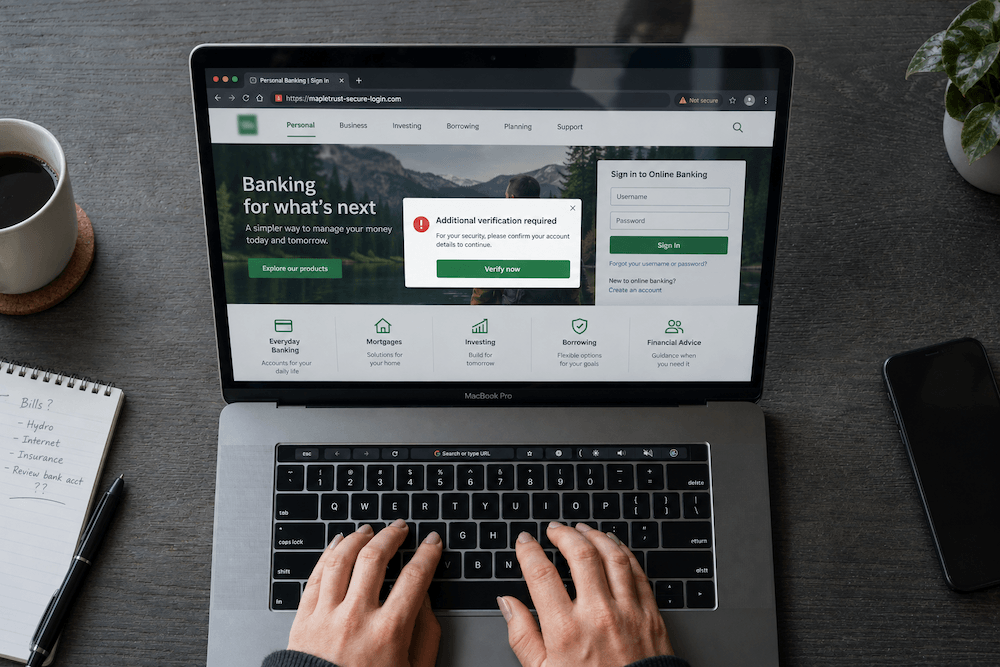
Fake Google ads can send you to a convincing bank login page that collects your credentials instead of signing you in. Before entering a password, open your bank through a verified bookmark or its official app. A familiar logo and a sponsored search placement are not proof that you have reached the bank.
Already entered your banking details? Contact your bank immediately through its official app or the number on your bank card, not the suspected advertisement. Tell the bank what you entered and whether you approved a payment or shared a login code. Do not wait for an unfamiliar transaction to appear.
The Bank Login Case Behind the Warning
On September 8, 2026, the U.S. Department of Justice announced the extradition of Sergei Anatolyevich Filimonov from the Republic of Georgia. Prosecutors allege that he participated in an operation using lookalike financial websites and sponsored search links to capture banking credentials.
The indictment alleges that supporting databases held more than 5,000 stolen login credentials. That is a credential count, not a confirmed count of individual victims. The charges are allegations, and the defendant is presumed innocent unless proven guilty.
A related DOJ announcement dated December 22, 2025 described fraudulent advertisements on Google and Bing. At that stage, investigators had identified at least 19 U.S. victims, approximately US$28 million in attempted losses, and approximately US$14.6 million in actual losses. Those are investigation-specific figures, not totals for all search ad scams.
How Fake Google Ads Lead to Bank Phishing Scams
The entry point is an ordinary search for a bank or account portal. Fraudulent advertisements direct visitors to fake banking websites with copied login pages. Credentials entered there can be captured and used against the real account. The FBI’s April 24, 2025 advisory also describes impersonation of payroll, unemployment, and health savings portals, so the risk extends beyond personal banking.
For a business owner, separate two questions: “Does this page look familiar?” and “Did I reach the address our bank or payroll provider confirmed?” The first is a visual impression. The second requires an independently verified reference, not another detail supplied by the same advertisement.
Compare the Address, Not Just the Bank Name
These fictional examples assume you have independently confirmed that your bank uses bank.example. They are teaching examples, not addresses from the investigation. The .example ending is reserved for examples in the IANA special-use domain registry.
| Address shown | What to notice |
|---|---|
bank.example | Matches the address independently verified for this fictional bank. |
bank-login.example | A different domain. Adding “login” does not establish a connection to the bank. |
bank.example.account-check.example | Belongs under account-check.example, not bank.example. The familiar name at the beginning is misleading. |
This exercise is not a rule that every unfamiliar address is fraudulent. A provider may use a separate, legitimate account service. The useful action is to confirm that service through a known contact before signing in. Do not guess from a company name embedded somewhere in a long address.
A Safer Routine for Financial Logins
- Start from a verified route. Use the official app already installed from a trusted source, or a bookmark created after confirming the bank’s address.
- Check where you landed. An advertisement can redirect elsewhere; inspect the destination before entering credentials.
- Keep multifactor authentication enabled. It adds protection, but a fake login page or impersonator may still try to capture a one-time code.
- End unexpected requests for login codes. Contact the institution yourself through a verified number.
These precautions follow the FBI’s search-ad warning and its November 25, 2025 account-takeover advisory. That later advisory reported more than 5,100 complaints and over US$262 million in losses since January 2025. Those figures cover broader account-takeover fraud, not just fake Google ads or the case above.
What to Do After Using a Suspected Fake Banking Website
- Contact the bank first. Explain the exposure and ask about securing access and recalling any unauthorized transfer. Recovery is not guaranteed.
- Replace exposed passwords through the real service. Change reused passwords on other accounts too. Follow the bank’s instructions for restoring access.
- Keep an incident record. Save the suspicious address, screenshots already available, messages, times, and transaction references. Do not revisit the page just to collect evidence or include passwords in your notes.
- Report through official channels. In Canada, follow the Canadian Anti-Fraud Centre’s victim guidance, including contacting local police and using the government’s fraud-reporting service. For U.S. incidents, report to the FBI Internet Crime Complaint Center.
The Canadian Anti-Fraud Centre also warns that victims may be approached again by people promising to recover their money. Do not send a recovery payment to someone making that promise.
A Practical Checklist for Business Impersonation Scams
Give staff a reference they can use before the next payroll run or supplier payment. We suggest a short internal record with the following fields:
- Approved account portals: the bank, payroll, and payment-provider addresses, plus who confirmed each one.
- Independent contacts: known support numbers and the colleague authorized to contact each provider.
- Escalation owner: who handles a suspicious ad, a copied website, or a reported credential exposure.
- Incident notes: when the issue was reported, what action was taken, and which provider reference numbers need follow-up.
Keep passwords and recovery codes out of that reference. For customer-facing communication, list your official website and contact details consistently. The FBI also recommends monitoring for similar domain registrations. Treat an alert as something to investigate, not automatic proof of fraud.
Maintaining your own website and responding to a copy hosted elsewhere are separate tasks. Our website maintenance services address your website’s upkeep. Maintenance does not stop another party registering a lookalike domain or guarantee removal of an impersonation site.
Are All Sponsored Search Results Unsafe?
No. The FBI notes that most search advertisements are not malicious. The practical distinction is between finding a business and verifying a sensitive login. Use search to discover services; use an independently confirmed route when accessing banking, payroll, or other financial accounts.